How do I speed up an Instagram reel on my computer?
Open the reel on instagram.com in Chrome, click the Reelread icon, then click 1× at the end of the reel's time bar in the side panel and pick a speed. You can choose 0.5×, 0.75×, Normal, 1.25×, 1.5× or 2×.
- Open a reel on instagram.com in Chrome or Microsoft Edge on your computer.
- Click the Reelread icon in the toolbar, or press Alt+Shift+R. The side panel opens with the reel's controls, and nothing is recorded.
- Click 1× and pick a speed. The reel keeps playing at that speed.
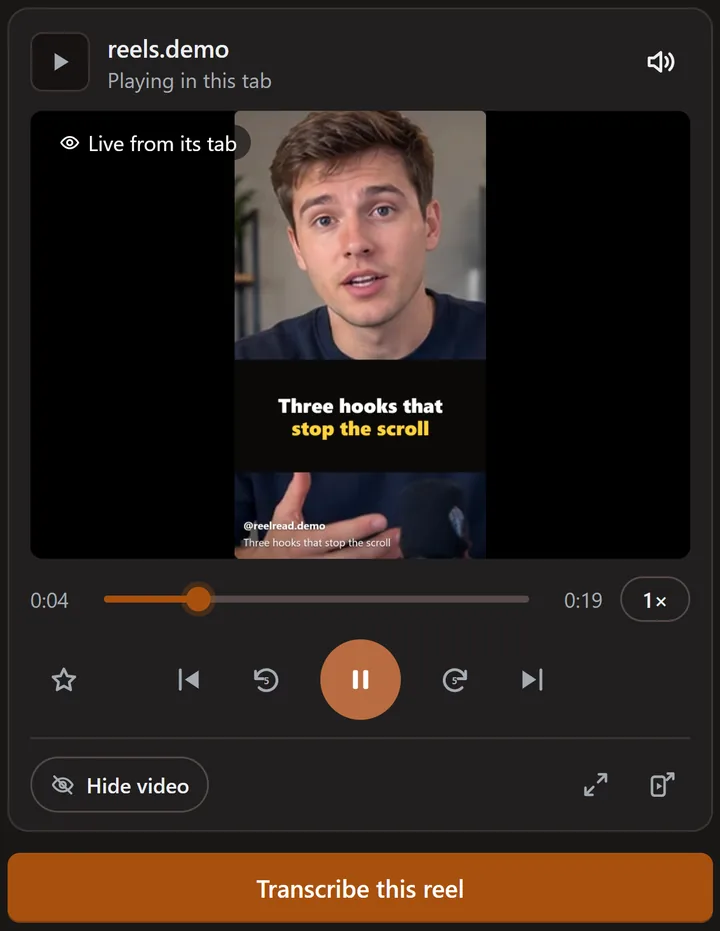 Reelread's controls on a demo reel we made ourselves.
How do I rewind or fast-forward a reel?
Press back 5 seconds or forward 5 seconds under the time bar, or drag the time bar to any moment. Play and pause sit in the middle, and the outer buttons go to the previous or next reel.
What can't it do?
It controls reels in your browser on a computer, not in the Instagram app on your phone. When you press Transcribe, Reelread plays the reel at normal speed, so the text comes out the same.
Questions
Can I watch Instagram reels at 2x speed on PC?
Yes. Open the reel in Chrome, click the Reelread icon, then click 1× in the side panel and pick 2×.
Can I slow down an Instagram reel?
Yes, to 0.75× or 0.5×: click 1× in Reelread's side panel and pick a slower speed. It helps when someone talks fast or you're learning the language.
How do I go back 5 seconds on an Instagram reel?
Press back 5 seconds in Reelread's side panel, as many times as you need. Forward 5 seconds jumps ahead the same way.
Can I keep watching while I work in another tab?
Yes: see how to watch reels and videos while you work.
Do the controls cost anything?
No. Speed, rewind, fast-forward, play, pause and next reel are free, with no daily limit. Free also includes unlimited transcripts for your first 5 days, then 7 a day; Reelread Complete, $11 once, adds unlimited transcripts and SRT subtitles. See pricing.
Does Reelread record the reel when I use the controls?
No. The controls only play, pause, move and change the speed of the reel, and Reelread hears a reel only after you press Transcribe. See what it can see, in plain words.