Can ChatGPT or Claude watch an Instagram reel?
Not from its link: the words said in a reel are in its sound, not written on its page, and neither ChatGPT nor Claude lists video among the files it takes. Give them the reel's words as text instead.
As of October 2026, OpenAI's help page on uploads lists documents, spreadsheets, presentations, images and audio (audio on paid plans) as the files ChatGPT takes, with no video. Anthropic's lists documents and images for Claude.
How do I summarize a reel with ChatGPT or Claude?
Transcribe the reel with Reelread, then press Send to AI and pick what you want. Your own chat opens with the reel's words and your request, ready to send.
- Open the reel in Chrome on your computer, click the Reelread icon and press Transcribe.
- Press Send to AI, pick "Summarise in 5 lines" or type your own request, then press Open in Claude or Open in ChatGPT.
- Your chat opens in a new tab with the words and your request in the box. Press send.
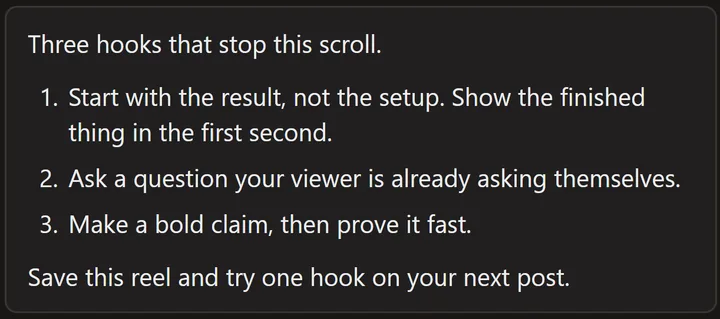 A demo reel we made ourselves, written out in Reelread.
Use another AI? Press Copy instead and paste the words into it.
What else can I ask for?
Send to AI has a few requests ready, and you can type your own:
- "Pull the steps into a checklist." For recipes, workouts and tutorials.
- "Write 3 hooks like this." For your own posts.
- "Turn into a post for X or LinkedIn."
- "Script my reply video."
- "Translate to Hindi." Or type another language.
What can't it do?
Reelread writes down what's said, and the summary comes from the AI chat you choose, under that chat's own terms. It sends nothing on its own: the words go to Claude or ChatGPT only when you press Open in Claude or Open in ChatGPT.
Questions
Does this work for TikToks and YouTube Shorts?
Yes. Reelread writes the words of TikToks, YouTube Shorts, Facebook reels and X videos the same way. See TikTok transcripts and YouTube Shorts, Facebook and X.
What if the reel is long?
Reelread writes up to 10 minutes per recording. When the words are too long to fit in the link, Reelread copies them for you, and the chat opens for you to paste them.
Do I need an account?
Reelread needs no account or login. ChatGPT and Claude have their own sign-in and plans.
Will the summary be accurate?
It's only as good as the transcript and the chat. Reelread can mishear names, slang and mixed languages, and AI chats can get things wrong, so check anything important against the reel.
Is it free?
Yes: Send to AI is free, with unlimited transcripts for your first 5 days, then 7 a day. Reelread Complete, $11 paid once, adds unlimited transcripts and SRT subtitles. See pricing.
Can I do this for a recipe reel?
Yes: pick "Pull the steps into a checklist", or ask for a shopping list. See how to get the recipe from a reel.